> ## Documentation Index
> Fetch the complete documentation index at: https://docs.dovetail.com/llms.txt
> Use this file to discover all available pages before exploring further.
# Authentication settings
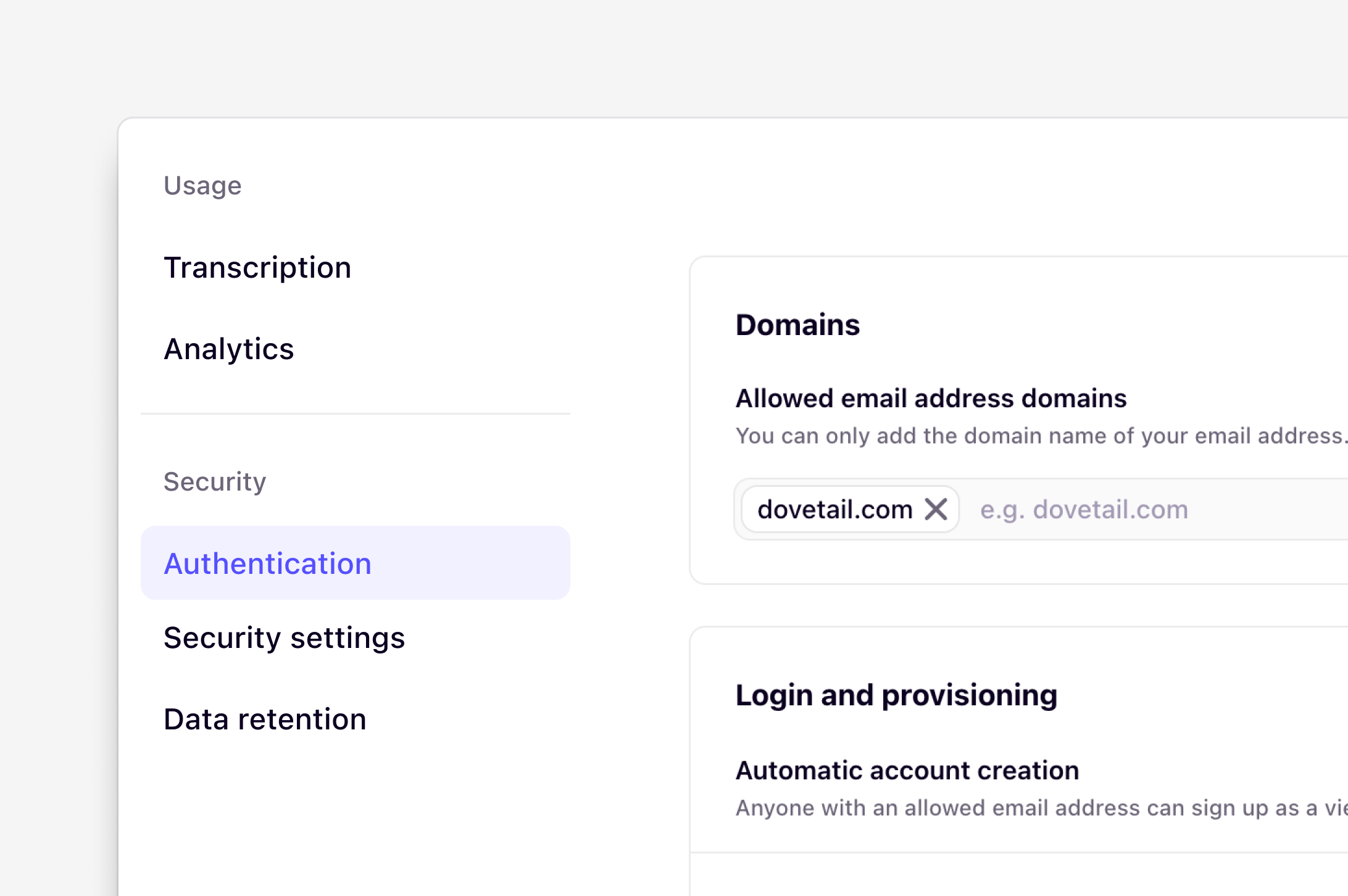 Only **workspace admins** can adjust these settings on the following plans:
* Current Business and Enterprise
* Legacy Business and Enterprise
* Legacy Professional
If there is a diamond on the Authentication tab, you are on a plan that does not support this feature.
## Overview
Workspace admins can streamline and manage user authentication to Dovetail. Use [Authentication settings](https://dovetail.com/settings/authentication) to set allowed email domains, enable automatic account creation, choose what methods users can use to sign up, and log in to the workspace.
***
## Set allowed email domains
Admins can set allowed email domains for your workspace so that they can be used for automating user provisioning. If there is a diamond on the Authentication tab, you are on a plan that does not support this feature.
* To do this, ⚙️ [Settings → Authentication](https://dovetail.com/settings/authentication), and enter your allowed email domain under Domains. Please note that you can only add the domain name of the email address you currently have in your email address to log into the workspace.
* Once entered, this will be automatically saved and applied to your workspace.
Only **workspace admins** can adjust these settings on the following plans:
* Current Business and Enterprise
* Legacy Business and Enterprise
* Legacy Professional
If there is a diamond on the Authentication tab, you are on a plan that does not support this feature.
## Overview
Workspace admins can streamline and manage user authentication to Dovetail. Use [Authentication settings](https://dovetail.com/settings/authentication) to set allowed email domains, enable automatic account creation, choose what methods users can use to sign up, and log in to the workspace.
***
## Set allowed email domains
Admins can set allowed email domains for your workspace so that they can be used for automating user provisioning. If there is a diamond on the Authentication tab, you are on a plan that does not support this feature.
* To do this, ⚙️ [Settings → Authentication](https://dovetail.com/settings/authentication), and enter your allowed email domain under Domains. Please note that you can only add the domain name of the email address you currently have in your email address to log into the workspace.
* Once entered, this will be automatically saved and applied to your workspace.
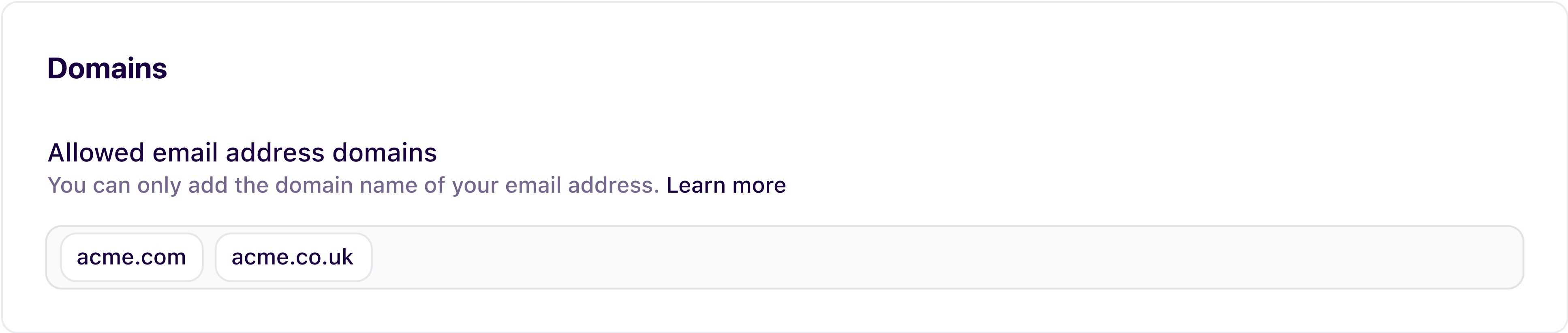 If you are trying to add a separate email domain to your own, please have a workspace admin reach out to [support@dovetail.com](mailto:support@dovetail.com), and our team will be happy to help. If you are chatting via the app messenger, request to speak to our support team, and Fin, our AI agent, can route you to the team.
***
## Automatic account creation
Enable automatic account creation to allow your colleagues who share an email domain with one of your allowed email domains to join your workspace as a viewer, without needing an invite.
Please note that:
* Viewers are only available on select legacy plans and our Enterprise plan.
* Automatic account creation is *enabled* by default.
* Managing automatic account creation is only available on Professional (***legacy***), Business, and Enterprise plans
***
## Authentication options
Available on **Business** and [Enterprise plans](https://dovetail.com/pricing/)
Allow your users to log in or sign up using various authentication options by enabling and disabling options to your desired configuration. [Learn how to streamline authentication to Dovetail →](https://dovetail.com/academy/streamline-authentication-to-dovetail/)
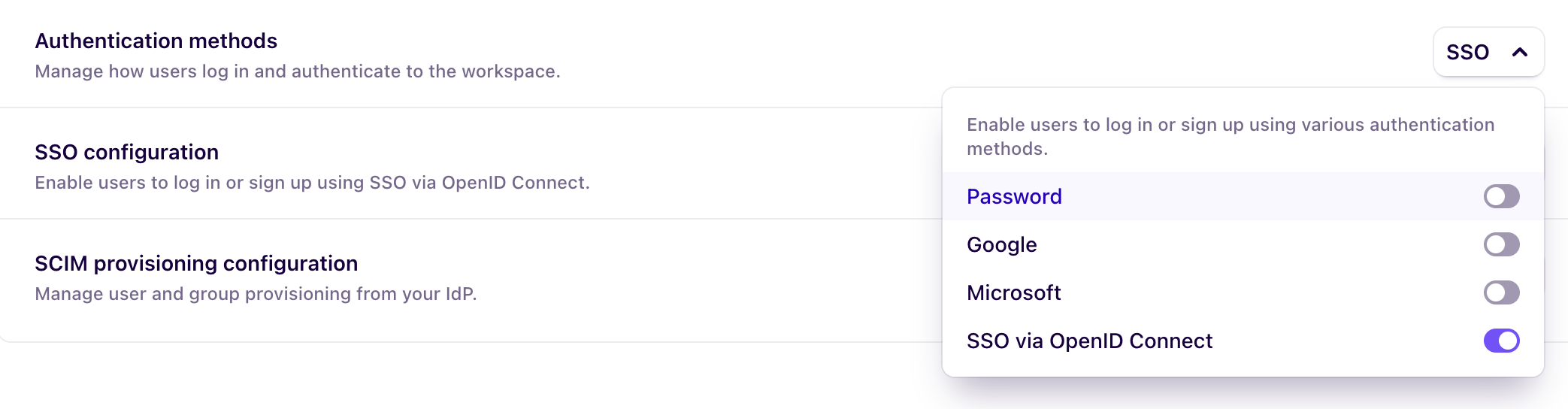
By default, users can sign up and log in to a workspace with:
* **Password**: Use an email address and create a password to log in.
* **Google**: Use your Google account email and password to sign up and log in to Dovetail.
* **Microsoft**: Use your Microsoft account email and password to sign up and log in to Dovetail.
Business and Enterprise workspaces have an additional authentication method available: **SSO**. Only Business and Enterprise plans can manage authentication methods — for example, restricting sign-up and login to SSO only. To enforce this, a workspace admin can go to ⚙️ [Settings → Authentication](https://dovetail.com/settings/authentication) → **Authentication connections.**
If you are trying to add a separate email domain to your own, please have a workspace admin reach out to [support@dovetail.com](mailto:support@dovetail.com), and our team will be happy to help. If you are chatting via the app messenger, request to speak to our support team, and Fin, our AI agent, can route you to the team.
***
## Automatic account creation
Enable automatic account creation to allow your colleagues who share an email domain with one of your allowed email domains to join your workspace as a viewer, without needing an invite.
Please note that:
* Viewers are only available on select legacy plans and our Enterprise plan.
* Automatic account creation is *enabled* by default.
* Managing automatic account creation is only available on Professional (***legacy***), Business, and Enterprise plans
***
## Authentication options
Available on **Business** and [Enterprise plans](https://dovetail.com/pricing/)
Allow your users to log in or sign up using various authentication options by enabling and disabling options to your desired configuration. [Learn how to streamline authentication to Dovetail →](https://dovetail.com/academy/streamline-authentication-to-dovetail/)
By default, users can sign up and log in to a workspace with:
* **Password**: Use an email address and create a password to log in.
* **Google**: Use your Google account email and password to sign up and log in to Dovetail.
* **Microsoft**: Use your Microsoft account email and password to sign up and log in to Dovetail.
Business and Enterprise workspaces have an additional authentication method available: **SSO**. Only Business and Enterprise plans can manage authentication methods — for example, restricting sign-up and login to SSO only. To enforce this, a workspace admin can go to ⚙️ [Settings → Authentication](https://dovetail.com/settings/authentication) → **Authentication connections.**
 ***
## Single sign-on (SSO) settings
Available on **Business** and [Enterprise plans](https://dovetail.com/pricing/)
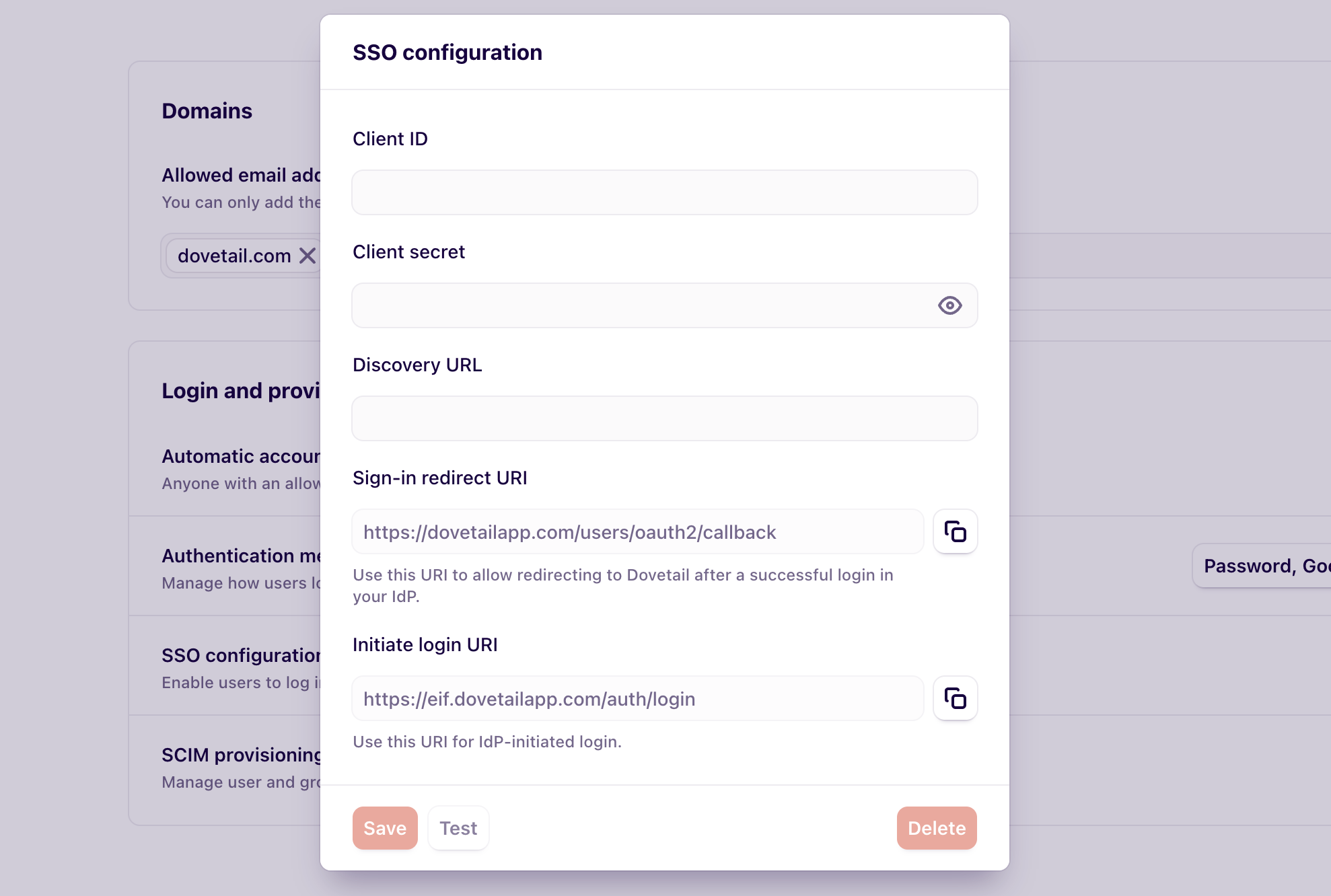
Enable SSO to allow your users to sign in to your workspace with ease. Configuring, validating, and maintaining SSO is your organization’s responsibility and is typically handled by your IT team. While Dovetail provides documentation and in-product guidance, we’re not able to configure or troubleshoot SSO on your behalf.A workspace Admin is required to set up and manage SSO in Dovetail. We recommend inviting your IT administrator into your Dovetail workspace and granting them Admin access so they can properly configure and maintain your SSO connection.
Our SSO experience is powered by Auth0 and designed to make setup as simple as possible. When creating an SSO enterprise connection, Dovetail automatically provides step-by-step instructions tailored to your selected identity provider. [Learn how to configure SSO for your workspace →](https://dovetail.com/help/configure-single-sign-on-sso/)
***
## Single sign-on (SSO) settings
Available on **Business** and [Enterprise plans](https://dovetail.com/pricing/)
Enable SSO to allow your users to sign in to your workspace with ease. Configuring, validating, and maintaining SSO is your organization’s responsibility and is typically handled by your IT team. While Dovetail provides documentation and in-product guidance, we’re not able to configure or troubleshoot SSO on your behalf.A workspace Admin is required to set up and manage SSO in Dovetail. We recommend inviting your IT administrator into your Dovetail workspace and granting them Admin access so they can properly configure and maintain your SSO connection.
Our SSO experience is powered by Auth0 and designed to make setup as simple as possible. When creating an SSO enterprise connection, Dovetail automatically provides step-by-step instructions tailored to your selected identity provider. [Learn how to configure SSO for your workspace →](https://dovetail.com/help/configure-single-sign-on-sso/)
 ***
## SCIM provisioning
Available on **Business** and [Enterprise plans](https://dovetail.com/pricing/)
Automatically provision, manage, and deactivate users by enabling SCIM provisioning. [Learn how to configure SCIM for your workspace →](https://dovetail.com/help/scim-overview/)
***
## Two-factor authentication
Available on all plans
When enabled, you’ll verify your identity using an authenticator app each time you sign in, protecting your account even if your password is compromised. [Learn how to configure two-factor authentication for your workspace →](https://docs.dovetail.com/help/two-factor-authentication)
***
## SCIM provisioning
Available on **Business** and [Enterprise plans](https://dovetail.com/pricing/)
Automatically provision, manage, and deactivate users by enabling SCIM provisioning. [Learn how to configure SCIM for your workspace →](https://dovetail.com/help/scim-overview/)
***
## Two-factor authentication
Available on all plans
When enabled, you’ll verify your identity using an authenticator app each time you sign in, protecting your account even if your password is compromised. [Learn how to configure two-factor authentication for your workspace →](https://docs.dovetail.com/help/two-factor-authentication)