> ## Documentation Index
> Fetch the complete documentation index at: https://docs.dovetail.com/llms.txt
> Use this file to discover all available pages before exploring further.
# Workspace tags
 Available on [Enterprise plan](https://dovetail.com/pricing/)
## Overview
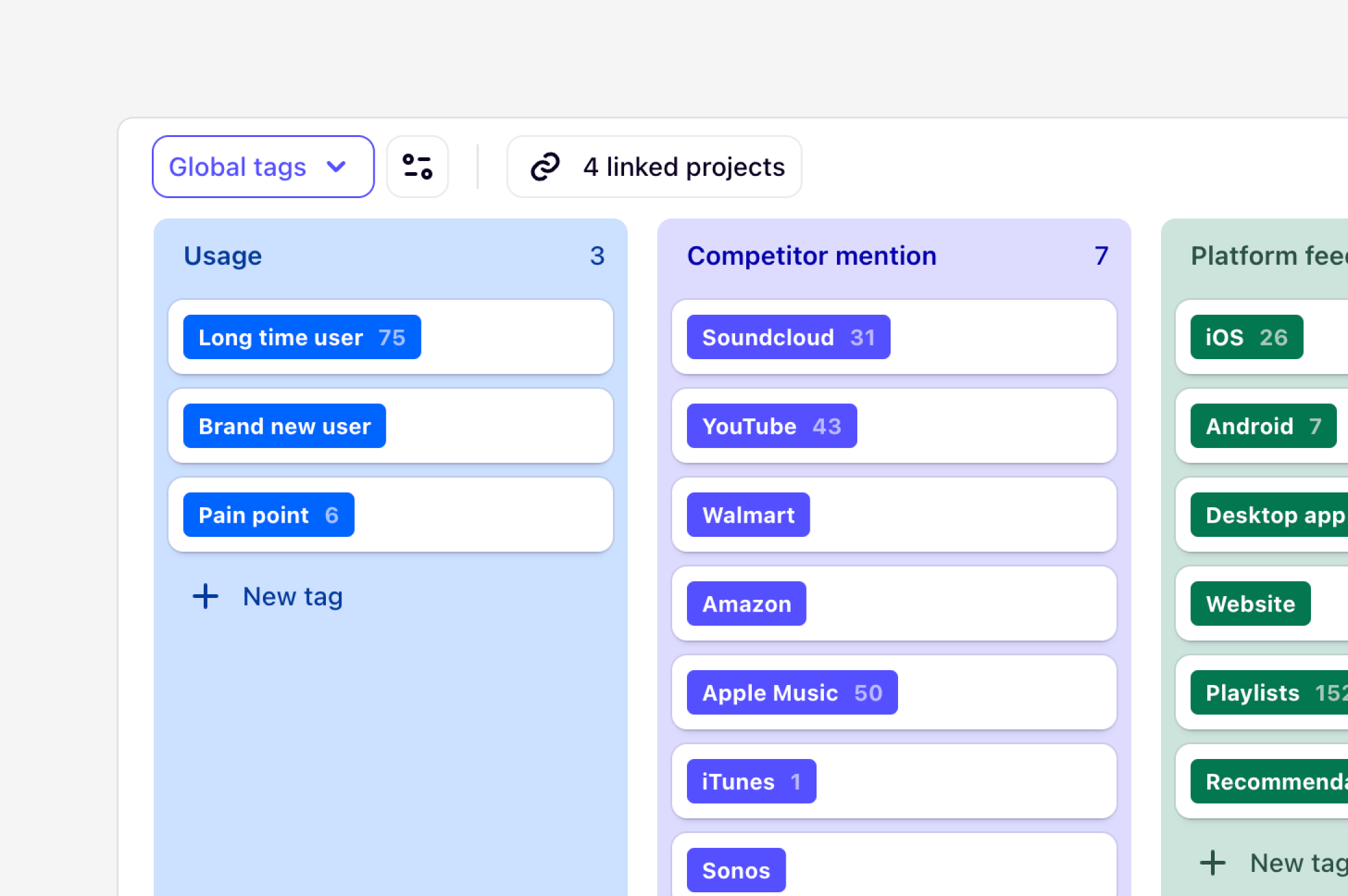
Workspace tags help connect themes across projects and teams. They are **global / universal tags** that can be linked and applied to data across multiple projects at once.
They are a mechanism for anyone who wants to create and standardize sets of tags for teams in the workspace. Workspace tag boards are commonly used for creating personas, shared feature requests, jobs-to-be-done, platform flows, and more.
***
## How workspace tag boards work
By default, tags in Dovetail live in a specific project and can’t be shared across projects. Workspace tag boards enable you to pull in and apply common 'global' tags that can be linked to and re-used across different projects.
When you create a workspace tag board, you’ll need to **link the tag board** to one or more projects so each project can use the tags.
Inside a project, nothing changes – tags are seamlessly integrated with existing tags inside a project. You can create highlights like normal, choosing workspace tags or project tags without too much thought.
Workspace tag boards are ‘live’ – changes you make to tags in a workspace tag board will immediately be reflected in all linked projects. In this sense, workspace tag boards in Dovetail are similar to **Masters** in Keynote, **Symbols**, and **Libraries** in Sketch, and **Components** in Figma.
***
## Create global tags for use across your workspace
[**Managers**](https://docs.dovetail.com/help/user-roles/#user-roles-for-enterprise) can create workspace tag boards and **contributors** can add individual tags to a workspace tag board. Create new tags based on the themes you care about tracking so they can be applied to highlights across projects in your workspace.
* To create a workspace tag board, navigate to [**⚙️ Settings → Tags**](https://dovetail.com/settings/tags) and select `New tag board`.
* From there, you can populate this board with individual tags by selecting `+ New tag` or `Import` to bring in a spreadsheet of existing global tags.
Once you’ve created your workspace tag board, you’ll want to link it to relevant projects. If they already exist in your workspace, select `Linked projects` and select your projects.
***
## Link a workspace tag board within a project
When working on a project, you can link a workspace tag board to this at any time.
* To do this, open your project, click `Tags`, and select Tag templates.
* From there, you will be able view all workspace tag boards available for you to link. Select your workspace tag board and click `Link to project` to confirm.
***
## Use workspace tags with magic highlight
When setting up workspace tags, you can use these as prompts to find magic highlights in your data. These will work alongside your project tags to automatically classify and group highlights in your project.
Over time, as the tag is applied to more highlights, it will become more accurate in recognizing when to apply it.
***
## Control who can access to specific workspace tags
You can limit who has full, edit, and view access to shared workspace tag boards in the workspace.
* To do this, open the workspace tag board, select `Share`, and assign **View only** access to the workspace. You will be the only user with **Full access** to the board.
* From there, you choose to invite other team members or [groups](https://dovetail.com/help/organize-users-into-groups/) to share **Full access,** **Edit access**, or **Can use** to the board.
Any manager or contributor with **Can use** access to the board can link the tag board to a project, but cannot add or remove tags from this board.
***
## Convert project tags for global use
If you have created a tag board in a project that would be better suited for global use, you can convert this to a workspace tag board without needing to recreate this.
* To do this, open your project, navigate to `Tags`, click `Edit` and select `Convert to workspace tag board`**.**
* From there, the tag board will be available for others to use and link to other projects in the workspace.
***
## Move or merge workspace tags
You can **move** tags from a project to a workspace tag board, or from one workspace tag board to another. To move a tag:
* To do this, hover your mouse over the tag you'd like to move, click on `•••`, and select `Move to`.
* From there, choose a tag board, and specific tag group to move the tag to.
You can undo this action immediately after by clicking the `Undo` button on the confirmation message in the bottom right corner.
Once in the same board, you can also **merge** similar tags with on another. By doing this, all highlights under a tagged will share the same workspace tag.
* To do this in your tag board, hover your mouse over the tag you'd like to move, click on `•••` and select `Merge into`.
* From there, choose the tag you want to merge your current tag into.
You can also use drag and drop to move a tag into another.
***
## Link a workspace tag board to a template
[Templates](/academy/intro-to-workspace-templates#create-your-first-project-template) help you standardize user research across your organization by giving other people a starting set of data, tags, and project configuration to begin new projects from.
Workspace tag boards can be linked directly to project templates. By linking a board, any new project created from your template will automatically include your workspace tag boards and connect related data across projects. [Learn how to link a workspace tag board to a project template](/academy/intro-to-workspace-tags) **→**
***
## Unlink a project or delete a workspace tag board
If you no longer wish to use a specific workspace tag board in a specific project, you can unlink the board from your project.
* To unlink a project, open your workspace tag board in [**⚙️ Settings → Tags**](https://dovetail.com/settings/tags).
* From there, click `Linked projects` and toggle off the project.
If you no longer need a workspace tag board, you can delete a workspace tag board. This goes to**trash** where it can be restored for 30 days. Only **managers** and **contributors** who have **Full access** to a tag board.
* To do this, open your workspace tag board in [**⚙️ Settings → Tags**](https://dovetail.com/settings/tags).
* From there, click on the title of your board and select `Move tag board to trash`.
When you unlink from a project or delete a whole workspace tag board, any
projects that were using it will be unlinked. From there, the tags will
duplicate into each project as local, project tags. This may result in
duplicated tags across your workspace.
Available on [Enterprise plan](https://dovetail.com/pricing/)
## Overview
Workspace tags help connect themes across projects and teams. They are **global / universal tags** that can be linked and applied to data across multiple projects at once.
They are a mechanism for anyone who wants to create and standardize sets of tags for teams in the workspace. Workspace tag boards are commonly used for creating personas, shared feature requests, jobs-to-be-done, platform flows, and more.
***
## How workspace tag boards work
By default, tags in Dovetail live in a specific project and can’t be shared across projects. Workspace tag boards enable you to pull in and apply common 'global' tags that can be linked to and re-used across different projects.
When you create a workspace tag board, you’ll need to **link the tag board** to one or more projects so each project can use the tags.
Inside a project, nothing changes – tags are seamlessly integrated with existing tags inside a project. You can create highlights like normal, choosing workspace tags or project tags without too much thought.
Workspace tag boards are ‘live’ – changes you make to tags in a workspace tag board will immediately be reflected in all linked projects. In this sense, workspace tag boards in Dovetail are similar to **Masters** in Keynote, **Symbols**, and **Libraries** in Sketch, and **Components** in Figma.
***
## Create global tags for use across your workspace
[**Managers**](https://docs.dovetail.com/help/user-roles/#user-roles-for-enterprise) can create workspace tag boards and **contributors** can add individual tags to a workspace tag board. Create new tags based on the themes you care about tracking so they can be applied to highlights across projects in your workspace.
* To create a workspace tag board, navigate to [**⚙️ Settings → Tags**](https://dovetail.com/settings/tags) and select `New tag board`.
* From there, you can populate this board with individual tags by selecting `+ New tag` or `Import` to bring in a spreadsheet of existing global tags.
Once you’ve created your workspace tag board, you’ll want to link it to relevant projects. If they already exist in your workspace, select `Linked projects` and select your projects.
***
## Link a workspace tag board within a project
When working on a project, you can link a workspace tag board to this at any time.
* To do this, open your project, click `Tags`, and select Tag templates.
* From there, you will be able view all workspace tag boards available for you to link. Select your workspace tag board and click `Link to project` to confirm.
***
## Use workspace tags with magic highlight
When setting up workspace tags, you can use these as prompts to find magic highlights in your data. These will work alongside your project tags to automatically classify and group highlights in your project.
Over time, as the tag is applied to more highlights, it will become more accurate in recognizing when to apply it.
***
## Control who can access to specific workspace tags
You can limit who has full, edit, and view access to shared workspace tag boards in the workspace.
* To do this, open the workspace tag board, select `Share`, and assign **View only** access to the workspace. You will be the only user with **Full access** to the board.
* From there, you choose to invite other team members or [groups](https://dovetail.com/help/organize-users-into-groups/) to share **Full access,** **Edit access**, or **Can use** to the board.
Any manager or contributor with **Can use** access to the board can link the tag board to a project, but cannot add or remove tags from this board.
***
## Convert project tags for global use
If you have created a tag board in a project that would be better suited for global use, you can convert this to a workspace tag board without needing to recreate this.
* To do this, open your project, navigate to `Tags`, click `Edit` and select `Convert to workspace tag board`**.**
* From there, the tag board will be available for others to use and link to other projects in the workspace.
***
## Move or merge workspace tags
You can **move** tags from a project to a workspace tag board, or from one workspace tag board to another. To move a tag:
* To do this, hover your mouse over the tag you'd like to move, click on `•••`, and select `Move to`.
* From there, choose a tag board, and specific tag group to move the tag to.
You can undo this action immediately after by clicking the `Undo` button on the confirmation message in the bottom right corner.
Once in the same board, you can also **merge** similar tags with on another. By doing this, all highlights under a tagged will share the same workspace tag.
* To do this in your tag board, hover your mouse over the tag you'd like to move, click on `•••` and select `Merge into`.
* From there, choose the tag you want to merge your current tag into.
You can also use drag and drop to move a tag into another.
***
## Link a workspace tag board to a template
[Templates](/academy/intro-to-workspace-templates#create-your-first-project-template) help you standardize user research across your organization by giving other people a starting set of data, tags, and project configuration to begin new projects from.
Workspace tag boards can be linked directly to project templates. By linking a board, any new project created from your template will automatically include your workspace tag boards and connect related data across projects. [Learn how to link a workspace tag board to a project template](/academy/intro-to-workspace-tags) **→**
***
## Unlink a project or delete a workspace tag board
If you no longer wish to use a specific workspace tag board in a specific project, you can unlink the board from your project.
* To unlink a project, open your workspace tag board in [**⚙️ Settings → Tags**](https://dovetail.com/settings/tags).
* From there, click `Linked projects` and toggle off the project.
If you no longer need a workspace tag board, you can delete a workspace tag board. This goes to**trash** where it can be restored for 30 days. Only **managers** and **contributors** who have **Full access** to a tag board.
* To do this, open your workspace tag board in [**⚙️ Settings → Tags**](https://dovetail.com/settings/tags).
* From there, click on the title of your board and select `Move tag board to trash`.
When you unlink from a project or delete a whole workspace tag board, any
projects that were using it will be unlinked. From there, the tags will
duplicate into each project as local, project tags. This may result in
duplicated tags across your workspace.