> ## Documentation Index
> Fetch the complete documentation index at: https://docs.dovetail.com/llms.txt
> Use this file to discover all available pages before exploring further.
# Web links
 Available on [Professional and Enterprise plans](https://dovetail.com/pricing/).
## Overview
Create a unique web link to share data, highlights, and Docs with people who aren’t users in your Dovetail workspace. Web links for data and highlights are created and enabled per object, while doc web links are enabled per project, meaning that all docs within that project will be available to anyone with the unique web link.
***
## Create a web link for data and highlights
You can create a unique web link to share a highlight from an original interview, participant's survey, or usability test. This will also enable any highlights created within the page to be viewable in a public view.
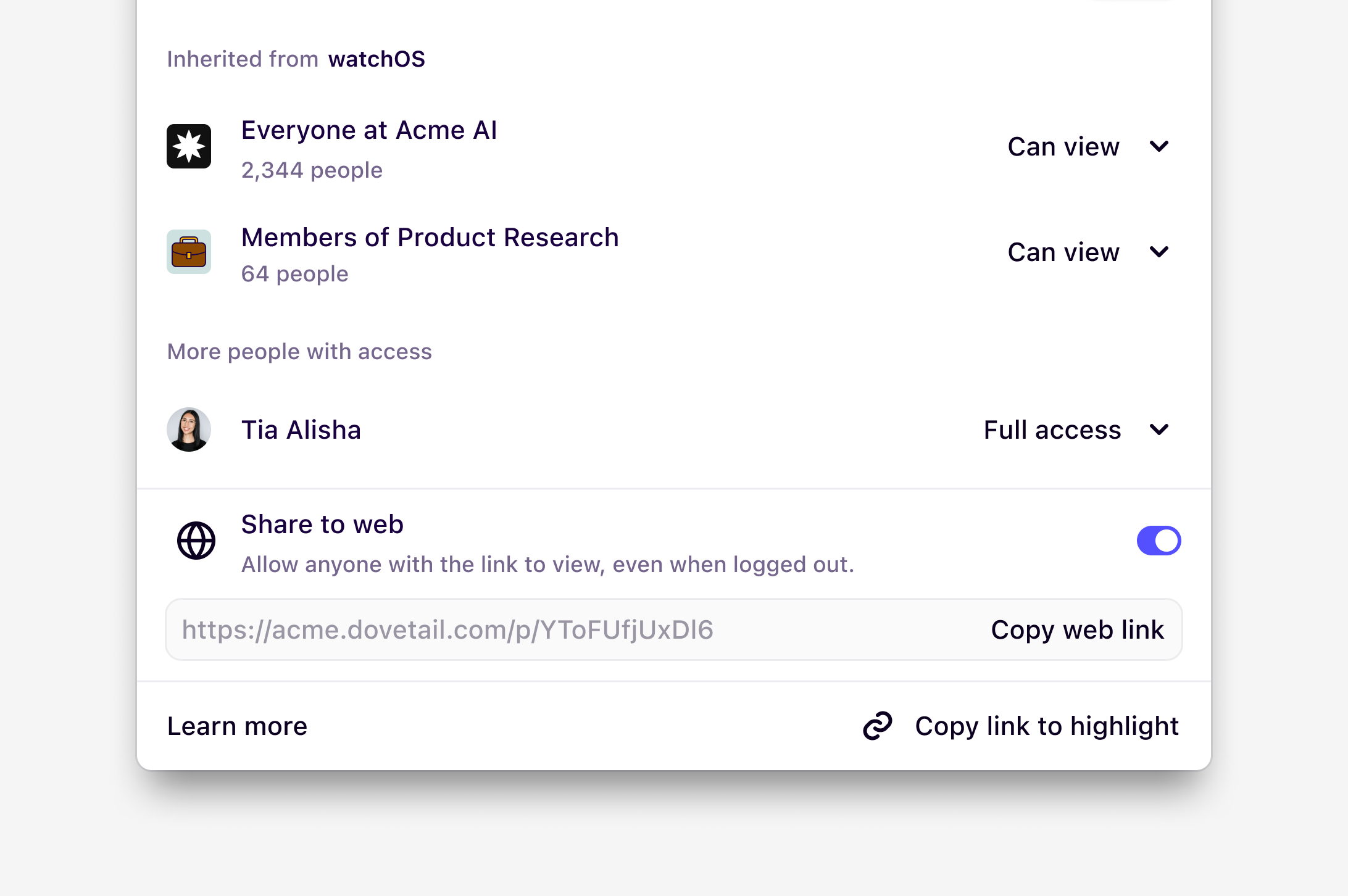
* To do this, open your data page, click on a highlight `Share`, and toggle on `Share to web`.
* Once enabled, click `Copy web link` and share this unique link with your team. From this link, anyone will be able to view this data page and any highlights within from your Dovetail workspace.
***
## Create a web link for Docs
To share Docs with those outside your Dovetail workspace, you can create a web link. At this time, this functionality can only be enabled at the project level and will be applied to all Docs in the project. This means that once enabled on a single Doc, **all** Docs in the same project will be viewable to others with access to this link.
### How to generate a Web Link
1. Open the Doc you want to share.
2. Click **Share** in the top-right corner.
3. Toggle "on" **Share to web**.
4. Copy the generated web link.
Anyone with access to the "Copy web link" can access the Doc, and **a**ll Docs within the project can be viewed via direct links, even when logged out.
For privacy reasons, search and answer blocks used in your doc will not be visible to users viewing your public doc.
***
## Disable web links for a workspace
Only [**Enterprise plans**](https://dovetail.com/pricing/) can disable the ability for users to create web links
Workspace admins can enable or disable this feature
If you’re on an **Enterprise** plan, admins can disable the ability to create web links for highlights and docs across the entire workspace.
* To do this, navigate to [**⚙️ Settings → Security**](https://dovetail.com/settings/security) and under Security, toggle on `Prevent users from creating web links`.
In addition, if you have the **HIPAA add-on**, the ability to create web links will be disabled by default for all projects in the workspace.
## FAQs
No. Any data, highlights, and docs that have been made shareable “to the web” are ***not*** indexed by search engines. So, the content won’t appear in Google or other search results. The only way someone can access the content is via the specific “Share to web” public link.
Available on [Professional and Enterprise plans](https://dovetail.com/pricing/).
## Overview
Create a unique web link to share data, highlights, and Docs with people who aren’t users in your Dovetail workspace. Web links for data and highlights are created and enabled per object, while doc web links are enabled per project, meaning that all docs within that project will be available to anyone with the unique web link.
***
## Create a web link for data and highlights
You can create a unique web link to share a highlight from an original interview, participant's survey, or usability test. This will also enable any highlights created within the page to be viewable in a public view.
* To do this, open your data page, click on a highlight `Share`, and toggle on `Share to web`.
* Once enabled, click `Copy web link` and share this unique link with your team. From this link, anyone will be able to view this data page and any highlights within from your Dovetail workspace.
***
## Create a web link for Docs
To share Docs with those outside your Dovetail workspace, you can create a web link. At this time, this functionality can only be enabled at the project level and will be applied to all Docs in the project. This means that once enabled on a single Doc, **all** Docs in the same project will be viewable to others with access to this link.
### How to generate a Web Link
1. Open the Doc you want to share.
2. Click **Share** in the top-right corner.
3. Toggle "on" **Share to web**.
4. Copy the generated web link.
Anyone with access to the "Copy web link" can access the Doc, and **a**ll Docs within the project can be viewed via direct links, even when logged out.
For privacy reasons, search and answer blocks used in your doc will not be visible to users viewing your public doc.
***
## Disable web links for a workspace
Only [**Enterprise plans**](https://dovetail.com/pricing/) can disable the ability for users to create web links
Workspace admins can enable or disable this feature
If you’re on an **Enterprise** plan, admins can disable the ability to create web links for highlights and docs across the entire workspace.
* To do this, navigate to [**⚙️ Settings → Security**](https://dovetail.com/settings/security) and under Security, toggle on `Prevent users from creating web links`.
In addition, if you have the **HIPAA add-on**, the ability to create web links will be disabled by default for all projects in the workspace.
## FAQs
No. Any data, highlights, and docs that have been made shareable “to the web” are ***not*** indexed by search engines. So, the content won’t appear in Google or other search results. The only way someone can access the content is via the specific “Share to web” public link.