> ## Documentation Index
> Fetch the complete documentation index at: https://docs.dovetail.com/llms.txt
> Use this file to discover all available pages before exploring further.
# Pendo
 ## Overview
Automatically import open-text responses from your Pendo Guides into Channels in real-time, where they're analyzed and grouped into themes so you can track trends over time. If your guide includes an NPS or CSAT poll alongside the free-text follow-up, Dovetail can pull the score across too — use Dashboards to visualize NPS and CSAT charts.
When you set up the connection, you'll pick one Pendo guide, choose which open-text polls to analyze, and optionally attach a single score poll. [Learn more about Channels →](/help/channels)
***
## Prerequisites
* A Dovetail workspace with Channels enabled and your user has Can edit or Full access on the Channel you're adding the source to.
* A Pendo subscription with API access enabled.
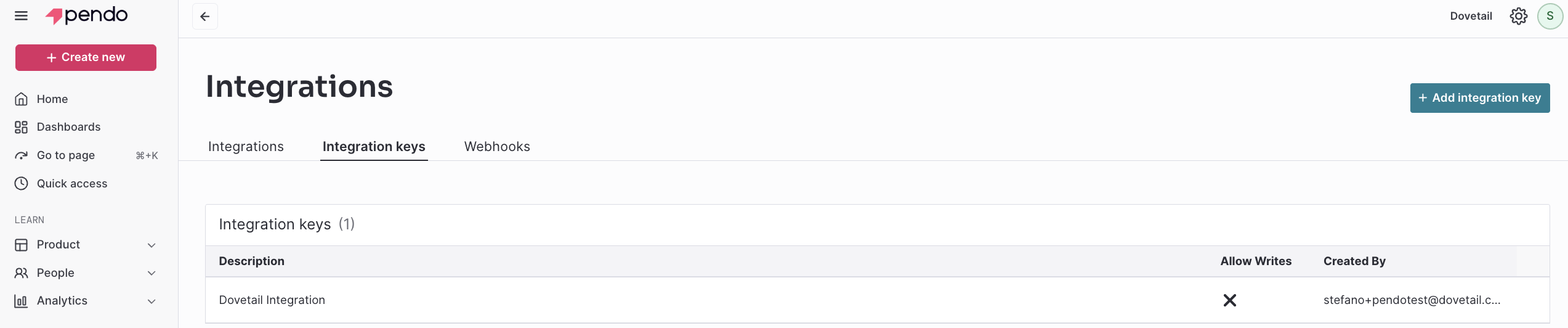
* A Pendo **integration key** with read access — generate or copy one from **Settings → Integrations** in Pendo. You'll need an account that can manage integration keys.
***
## Set up the Pendo integration
You can set up the Pendo integration from [Settings](https://dovetail.com/settings/integrations), when you create a new Channel, or when you `Add source` to an existing Channel.
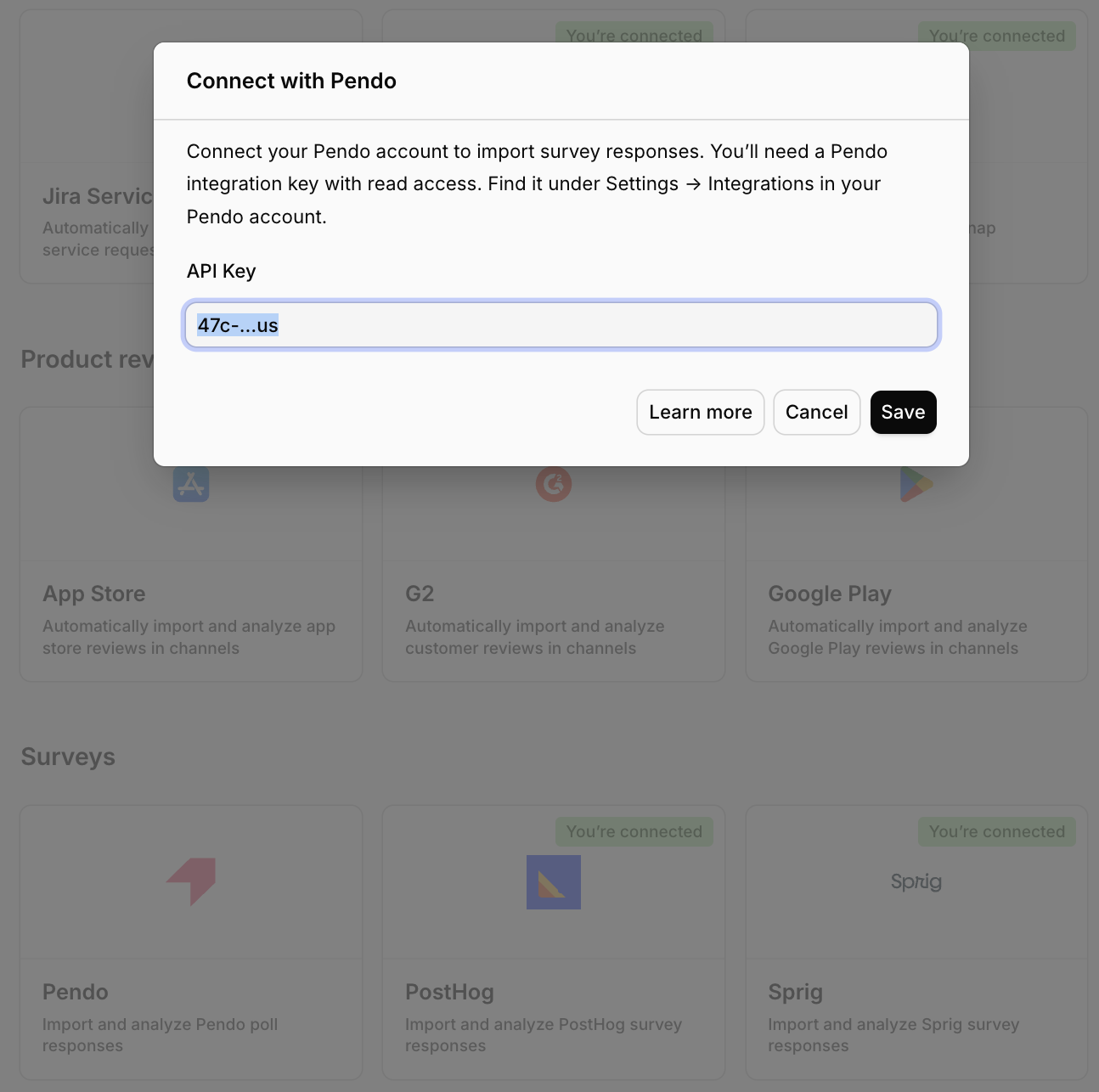
In Dovetail, open the **Connect data source** modal and select `Pendo`.
In a separate tab, sign in to Pendo, open **Settings → Integrations**, and copy your integration key. It looks like `47c78ed4-…us`, where the suffix after the dot tells Dovetail which Pendo region to call (`us`, `eu`, `us1`, `jpn`, or `au`).
Paste the key into the **Integration key** field and select `Next`.
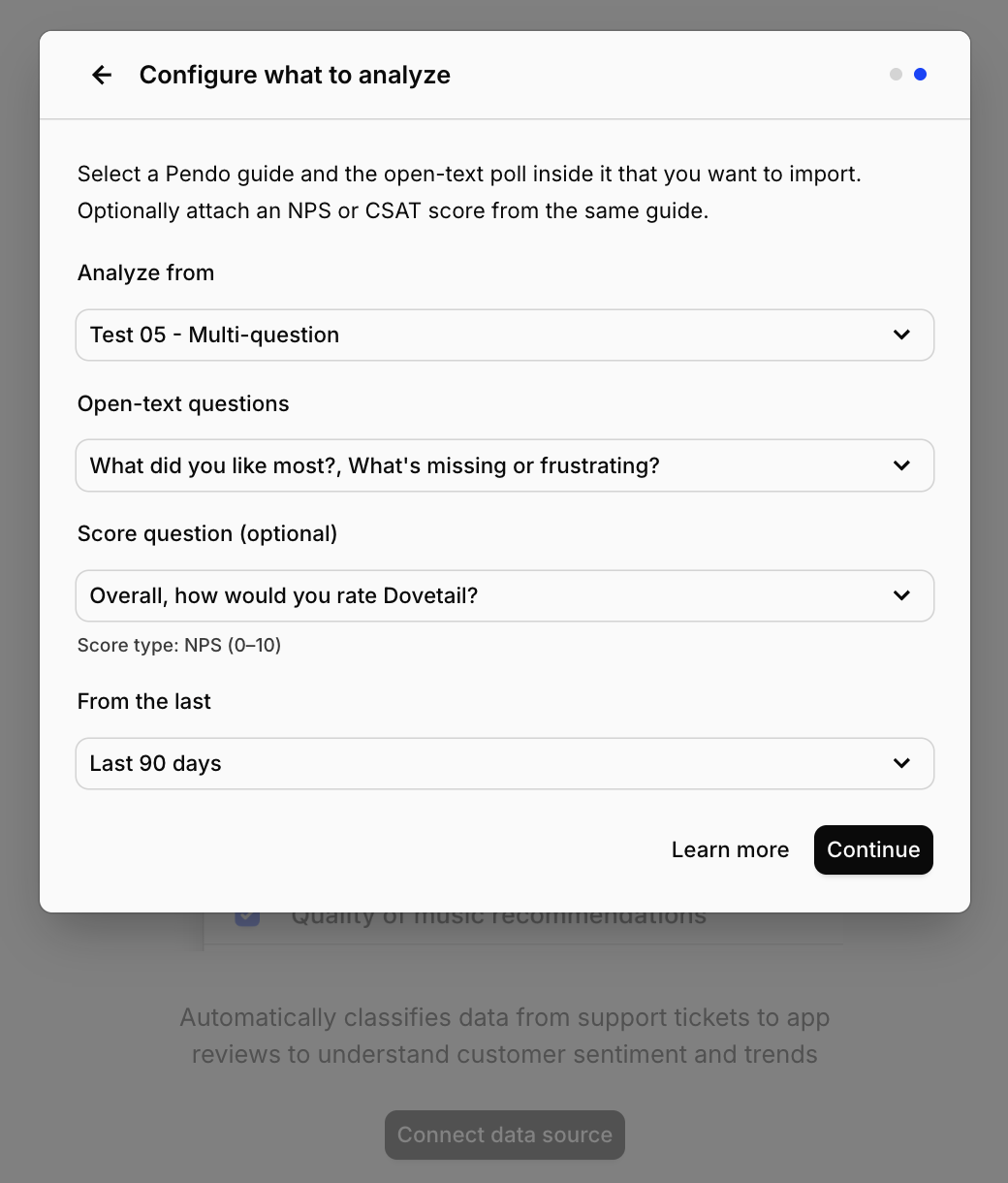
Choose the **Pendo guide** you want to analyze. Only public guides that contain at least one open-text (FreeForm) poll appear in the list — drafts, disabled guides, and guides without an open-text question are filtered out.
Select one or more **open-text polls** inside that guide. If the guide has exactly one open-text poll, Dovetail selects it for you.
Optionally pick a single **NPS or CSAT poll** as a score field. Only NPS (0–10) and CSAT (1–5 or another small numeric range) polls are eligible — other numeric scales aren't supported as score fields.
Choose how far back to import existing responses: `Last 7 days`, `Last 30 days`, `Last 90 days`, or `Last 6 months`.
Confirm setup and select `Finish`.
## Overview
Automatically import open-text responses from your Pendo Guides into Channels in real-time, where they're analyzed and grouped into themes so you can track trends over time. If your guide includes an NPS or CSAT poll alongside the free-text follow-up, Dovetail can pull the score across too — use Dashboards to visualize NPS and CSAT charts.
When you set up the connection, you'll pick one Pendo guide, choose which open-text polls to analyze, and optionally attach a single score poll. [Learn more about Channels →](/help/channels)
***
## Prerequisites
* A Dovetail workspace with Channels enabled and your user has Can edit or Full access on the Channel you're adding the source to.
* A Pendo subscription with API access enabled.
* A Pendo **integration key** with read access — generate or copy one from **Settings → Integrations** in Pendo. You'll need an account that can manage integration keys.
***
## Set up the Pendo integration
You can set up the Pendo integration from [Settings](https://dovetail.com/settings/integrations), when you create a new Channel, or when you `Add source` to an existing Channel.
In Dovetail, open the **Connect data source** modal and select `Pendo`.
In a separate tab, sign in to Pendo, open **Settings → Integrations**, and copy your integration key. It looks like `47c78ed4-…us`, where the suffix after the dot tells Dovetail which Pendo region to call (`us`, `eu`, `us1`, `jpn`, or `au`).
Paste the key into the **Integration key** field and select `Next`.
Choose the **Pendo guide** you want to analyze. Only public guides that contain at least one open-text (FreeForm) poll appear in the list — drafts, disabled guides, and guides without an open-text question are filtered out.
Select one or more **open-text polls** inside that guide. If the guide has exactly one open-text poll, Dovetail selects it for you.
Optionally pick a single **NPS or CSAT poll** as a score field. Only NPS (0–10) and CSAT (1–5 or another small numeric range) polls are eligible — other numeric scales aren't supported as score fields.
Choose how far back to import existing responses: `Last 7 days`, `Last 30 days`, `Last 90 days`, or `Last 6 months`.
Confirm setup and select `Finish`.
 ### Authentication and permissions
Pendo uses an **integration key**. The key is passed as the `x-pendo-integration-key` header on every request and Dovetail only ever issues read requests — guide metadata and poll responses are fetched; nothing is written back to Pendo.
The key needs read access to:
* The `/guide` endpoint, used to list guides and their polls.
* The `/aggregation` endpoint, used to fetch `pollsSeen` aggregations (the response data).
Your Pendo plan must include API access in order to obtain a key. Pendo's standard guide permissions still apply — Dovetail only sees what the key's subscription is allowed to see.
***
## Configuration in detail
### Picking a guide
You can pick **one guide** per data source connection. Dovetail only shows guides that are publicly published and contain at least one open-text poll. If a guide doesn't show up:
* It might be a draft or disabled guide.
* It might only contain rating, NPS, or other numeric polls without an accompanying open-text question.
* It might not have been published to a Pendo segment yet.
To analyze polls across more than one guide in the same Channel, add Pendo as a data source again with a different guide selected.
### Picking open-text polls
Within the chosen guide, you can select one or more **open-text polls** to import. Every selected poll's response becomes a turn in the same conversation per respondent, so if a guide has a "Why?" and an "Anything else?" poll, both answers from the same visitor land on the same data point as a multi-turn exchange.
### Picking a score poll (optional)
You can optionally pick **one** NPS or CSAT poll from the same guide. Dovetail adds the score as a field onto the same data point as the open-text answer, which allows the channel to be selected as a source for NPS and CSAT charts in Dashboards. Score polls outside the NPS (0–10) or CSAT (1–5) shape aren't eligible.
***
## What gets imported
Every poll submission Dovetail imports becomes one Channels data point per visitor per submission, with the open-text answer (or answers) as the conversation content and metadata attached as fields you can filter and roll up by.
### Always imported
| Field | Source |
| ------------------------------- | ---------------------------------------------------------------------- |
| Guide ID | Pendo guide ID |
| Guide name | Pendo guide name (falls back to guide ID if missing) |
| Pendo visitor ID | Pendo's `visitorId` for the respondent |
| Pendo account ID | Pendo's `accountId` for the respondent's account (only if set) |
| Question text and response text | Each selected open-text poll appears as a Q+A pair in the conversation |
| Submission timestamp | Pendo `time` field on the poll submission |
### Imported when configured
| Field | When |
| ---------------- | ----------------------------------------------- |
| NPS score (0–10) | When an NPS poll is attached as the score field |
| CSAT score (1–5) | When a CSAT poll is attached as the score field |
### Not imported
* Polls or responses from a **draft or disabled guide** — they won't appear in the picker and won't sync.
* Submissions where the visitor only answered a score poll and skipped every selected open-text poll — Dovetail needs at least one open-text answer to create a data point.
* **Other poll types** (rating scales outside NPS/CSAT shape, dropdowns, multi-select) — only open-text polls land as conversation text, and only NPS/CSAT polls land as a score field.
* **Visitor or account metadata** beyond IDs — names, emails, or custom Pendo metadata aren't pulled.
* Polls served through **headless** delivery — Dovetail filters those out at the API level.
* **Attachments** or media — Pendo polls don't carry these.
* **Derived analytics** — Pendo's own engagement metrics, segments, or NPS/CSAT roll-ups aren't imported; Dovetail computes its own analysis on the raw responses.
Need a field that isn't on this list? Let us know.
### Sync behavior
* **Backfill window.** When you first connect, Dovetail imports responses received within the period you selected (7 days, 30 days, 90 days, or 6 months).
* **Ongoing sync.** New responses sync in automatically after the initial backfill on the standard Channels cadence.
* **Pagination.** Dovetail fetches responses in pages of 5,000 records and continues until the page is complete.
* **Rate limiting.** If Pendo rate-limits a request, Dovetail backs off and retries automatically.
***
## Troubleshooting
**"Invalid integration key" when I paste the key.** Either the key is wrong, the key has been deleted in Pendo, or your Pendo subscription doesn't have API access enabled. Generate a fresh key under **Settings → Integrations** in Pendo and confirm with your Pendo admin that API access is on.
**My guide doesn't show up in the picker.** Dovetail only lists public guides that contain at least one open-text poll. Check that the guide is published (not a draft), is not disabled, and has at least one FreeForm question on it.
**My poll doesn't show up in the score-poll dropdown.** Only NPS (0–10) and CSAT (1–5 or another small numeric range) polls are eligible. Other rating scales and number inputs aren't supported as score fields.
**My poll has responses in Pendo but Dovetail says nothing imported.** Possible reasons:
* Every response in the backfill window only answered the score poll and skipped every selected open-text poll. Dovetail needs at least one open-text answer to create a data point.
* The responses were submitted outside the backfill window. Try connecting again with a longer window, or wait for new responses to come in.
* The responses were captured via Pendo's headless delivery, which Dovetail filters out.
**I want to analyze multiple guides in the same Channel.** Add Pendo as a data source on the same Channel once per guide.
***
## Disconnect or delete the Pendo source
There are two distinct actions on a Channels source.
**Disconnect.** Stops Dovetail from ingesting any new data from this source. Anything already imported stays in the Channel.
To disconnect, open the Channel, go to the sources list, click `•••` on the Pendo source, and select `Disconnect`. You'll see:
> Are you sure you want to disconnect **\[source name]** from **\[Channel name]**? This will immediately stop the Channel from ingesting any new data. Any data already imported from this source will remain in the Channel.
**Delete.** Removes the source and **deletes every data point** that was imported from it. This is permanent.
To delete, click `•••` on the Pendo source and select `Delete`. You'll see:
> Are you sure you want to delete **\[source name]** from **\[Channel name]**? This will delete all associated data points. This is permanent and cannot be undone.
To revoke API access entirely, delete the integration key in Pendo under **Settings → Integrations**. That immediately invalidates any sync that tries to use it.
### Authentication and permissions
Pendo uses an **integration key**. The key is passed as the `x-pendo-integration-key` header on every request and Dovetail only ever issues read requests — guide metadata and poll responses are fetched; nothing is written back to Pendo.
The key needs read access to:
* The `/guide` endpoint, used to list guides and their polls.
* The `/aggregation` endpoint, used to fetch `pollsSeen` aggregations (the response data).
Your Pendo plan must include API access in order to obtain a key. Pendo's standard guide permissions still apply — Dovetail only sees what the key's subscription is allowed to see.
***
## Configuration in detail
### Picking a guide
You can pick **one guide** per data source connection. Dovetail only shows guides that are publicly published and contain at least one open-text poll. If a guide doesn't show up:
* It might be a draft or disabled guide.
* It might only contain rating, NPS, or other numeric polls without an accompanying open-text question.
* It might not have been published to a Pendo segment yet.
To analyze polls across more than one guide in the same Channel, add Pendo as a data source again with a different guide selected.
### Picking open-text polls
Within the chosen guide, you can select one or more **open-text polls** to import. Every selected poll's response becomes a turn in the same conversation per respondent, so if a guide has a "Why?" and an "Anything else?" poll, both answers from the same visitor land on the same data point as a multi-turn exchange.
### Picking a score poll (optional)
You can optionally pick **one** NPS or CSAT poll from the same guide. Dovetail adds the score as a field onto the same data point as the open-text answer, which allows the channel to be selected as a source for NPS and CSAT charts in Dashboards. Score polls outside the NPS (0–10) or CSAT (1–5) shape aren't eligible.
***
## What gets imported
Every poll submission Dovetail imports becomes one Channels data point per visitor per submission, with the open-text answer (or answers) as the conversation content and metadata attached as fields you can filter and roll up by.
### Always imported
| Field | Source |
| ------------------------------- | ---------------------------------------------------------------------- |
| Guide ID | Pendo guide ID |
| Guide name | Pendo guide name (falls back to guide ID if missing) |
| Pendo visitor ID | Pendo's `visitorId` for the respondent |
| Pendo account ID | Pendo's `accountId` for the respondent's account (only if set) |
| Question text and response text | Each selected open-text poll appears as a Q+A pair in the conversation |
| Submission timestamp | Pendo `time` field on the poll submission |
### Imported when configured
| Field | When |
| ---------------- | ----------------------------------------------- |
| NPS score (0–10) | When an NPS poll is attached as the score field |
| CSAT score (1–5) | When a CSAT poll is attached as the score field |
### Not imported
* Polls or responses from a **draft or disabled guide** — they won't appear in the picker and won't sync.
* Submissions where the visitor only answered a score poll and skipped every selected open-text poll — Dovetail needs at least one open-text answer to create a data point.
* **Other poll types** (rating scales outside NPS/CSAT shape, dropdowns, multi-select) — only open-text polls land as conversation text, and only NPS/CSAT polls land as a score field.
* **Visitor or account metadata** beyond IDs — names, emails, or custom Pendo metadata aren't pulled.
* Polls served through **headless** delivery — Dovetail filters those out at the API level.
* **Attachments** or media — Pendo polls don't carry these.
* **Derived analytics** — Pendo's own engagement metrics, segments, or NPS/CSAT roll-ups aren't imported; Dovetail computes its own analysis on the raw responses.
Need a field that isn't on this list? Let us know.
### Sync behavior
* **Backfill window.** When you first connect, Dovetail imports responses received within the period you selected (7 days, 30 days, 90 days, or 6 months).
* **Ongoing sync.** New responses sync in automatically after the initial backfill on the standard Channels cadence.
* **Pagination.** Dovetail fetches responses in pages of 5,000 records and continues until the page is complete.
* **Rate limiting.** If Pendo rate-limits a request, Dovetail backs off and retries automatically.
***
## Troubleshooting
**"Invalid integration key" when I paste the key.** Either the key is wrong, the key has been deleted in Pendo, or your Pendo subscription doesn't have API access enabled. Generate a fresh key under **Settings → Integrations** in Pendo and confirm with your Pendo admin that API access is on.
**My guide doesn't show up in the picker.** Dovetail only lists public guides that contain at least one open-text poll. Check that the guide is published (not a draft), is not disabled, and has at least one FreeForm question on it.
**My poll doesn't show up in the score-poll dropdown.** Only NPS (0–10) and CSAT (1–5 or another small numeric range) polls are eligible. Other rating scales and number inputs aren't supported as score fields.
**My poll has responses in Pendo but Dovetail says nothing imported.** Possible reasons:
* Every response in the backfill window only answered the score poll and skipped every selected open-text poll. Dovetail needs at least one open-text answer to create a data point.
* The responses were submitted outside the backfill window. Try connecting again with a longer window, or wait for new responses to come in.
* The responses were captured via Pendo's headless delivery, which Dovetail filters out.
**I want to analyze multiple guides in the same Channel.** Add Pendo as a data source on the same Channel once per guide.
***
## Disconnect or delete the Pendo source
There are two distinct actions on a Channels source.
**Disconnect.** Stops Dovetail from ingesting any new data from this source. Anything already imported stays in the Channel.
To disconnect, open the Channel, go to the sources list, click `•••` on the Pendo source, and select `Disconnect`. You'll see:
> Are you sure you want to disconnect **\[source name]** from **\[Channel name]**? This will immediately stop the Channel from ingesting any new data. Any data already imported from this source will remain in the Channel.
**Delete.** Removes the source and **deletes every data point** that was imported from it. This is permanent.
To delete, click `•••` on the Pendo source and select `Delete`. You'll see:
> Are you sure you want to delete **\[source name]** from **\[Channel name]**? This will delete all associated data points. This is permanent and cannot be undone.
To revoke API access entirely, delete the integration key in Pendo under **Settings → Integrations**. That immediately invalidates any sync that tries to use it.