> ## Documentation Index
> Fetch the complete documentation index at: https://docs.dovetail.com/llms.txt
> Use this file to discover all available pages before exploring further.
# PostHog
 ## Overview
Automatically import responses to your PostHog Surveys into Channels in real-time, where they're analyzed and grouped into themes so you can track trends over time. If your survey pairs an open-text question with an NPS or CSAT score, Dovetail can pull both — use Dashboards to visualize NPS and CSAT charts.
When you set up the connection, you'll pick one survey, choose which open-text questions to analyze, and optionally attach a single NPS or CSAT score question. [Learn more about Channels →](/help/channels)
***
## Prerequisites
* A Dovetail workspace with Channels enabled and your user has Can edit or Full access on the Channel you're adding the source to.
* A PostHog account on either PostHog Cloud US (`us.posthog.com`) or PostHog Cloud EU (`eu.posthog.com`).
* The PostHog **project ID** for the project you want to import from. Find it under **Project settings → Details** in PostHog.
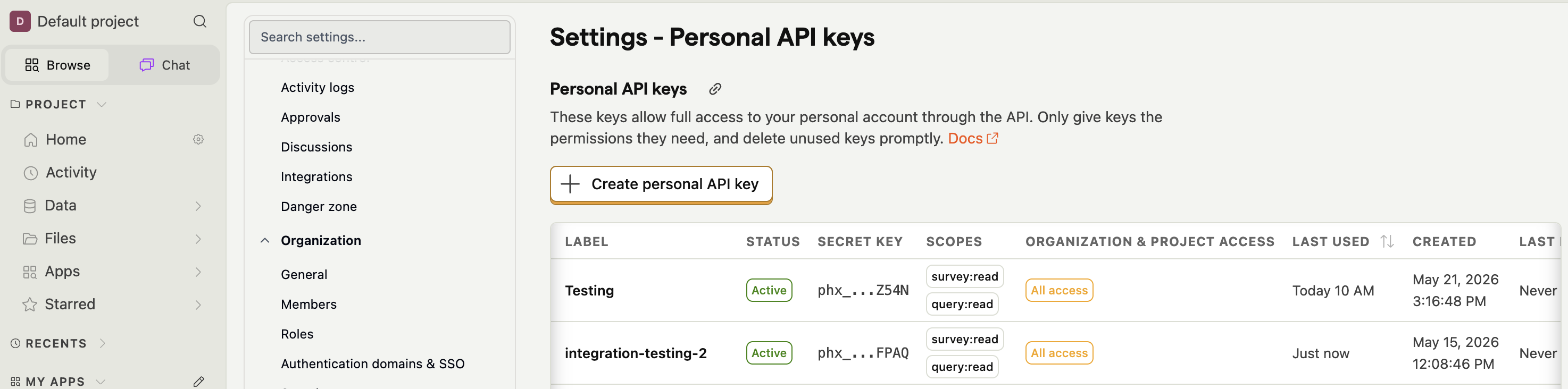
* A PostHog **personal API key** scoped to `survey:read` and `query:read`. Generate one under your account menu → **Personal API keys** in PostHog.
***
## Set up the PostHog integration
You can set up the PostHog integration from [Settings](https://dovetail.com/settings/integrations), when you create a new Channel, or when you `Add source` to an existing Channel.
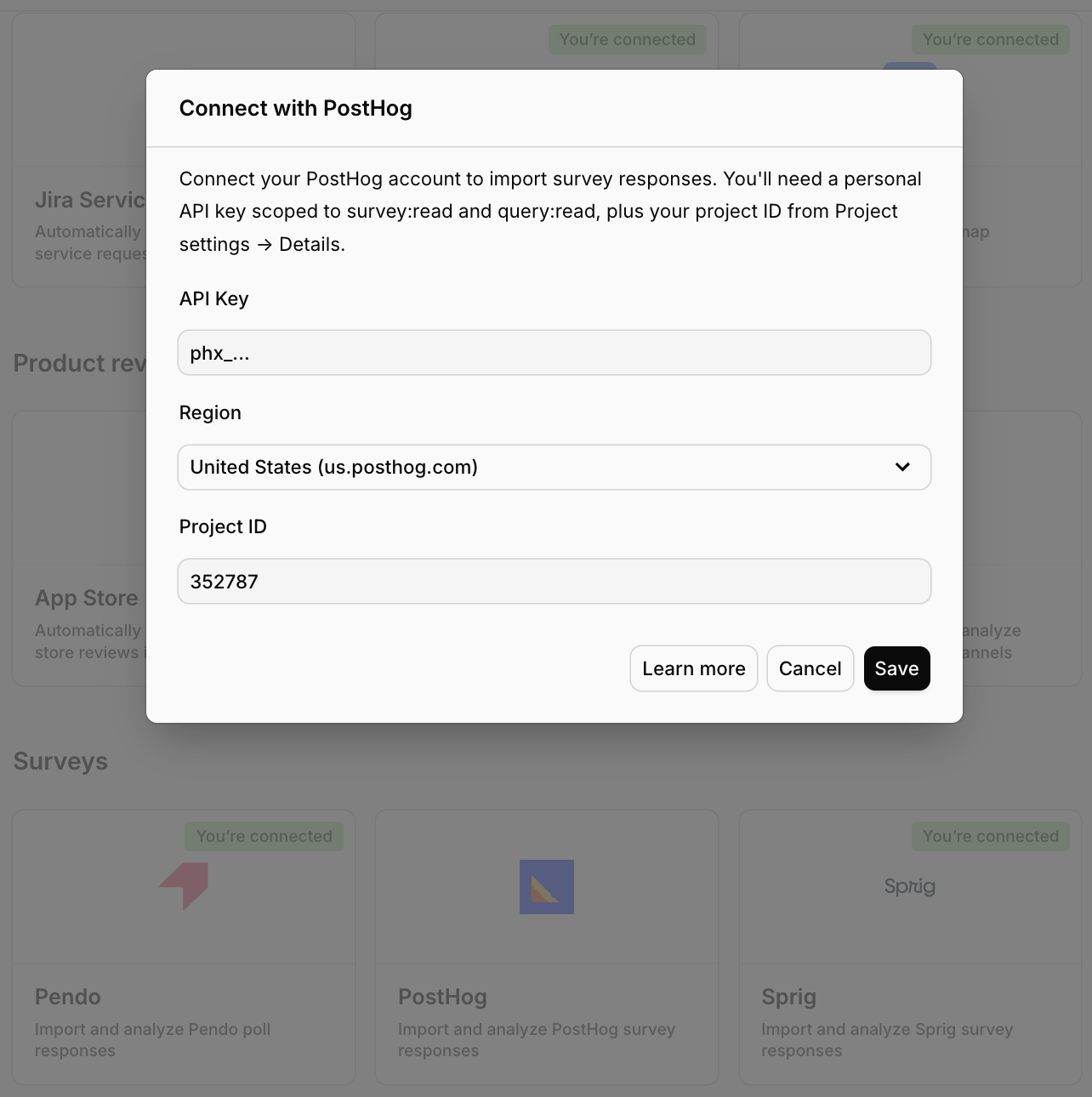
In Dovetail, open the **Connect data source** modal and select `PostHog`.
Choose **Region** — `United States (us.posthog.com)` or `European Union (eu.posthog.com)`.
Enter your **Project ID** (a numeric value from PostHog's Project settings).
Paste your **Personal API key** (starts with `phx_`) and select `Next`.
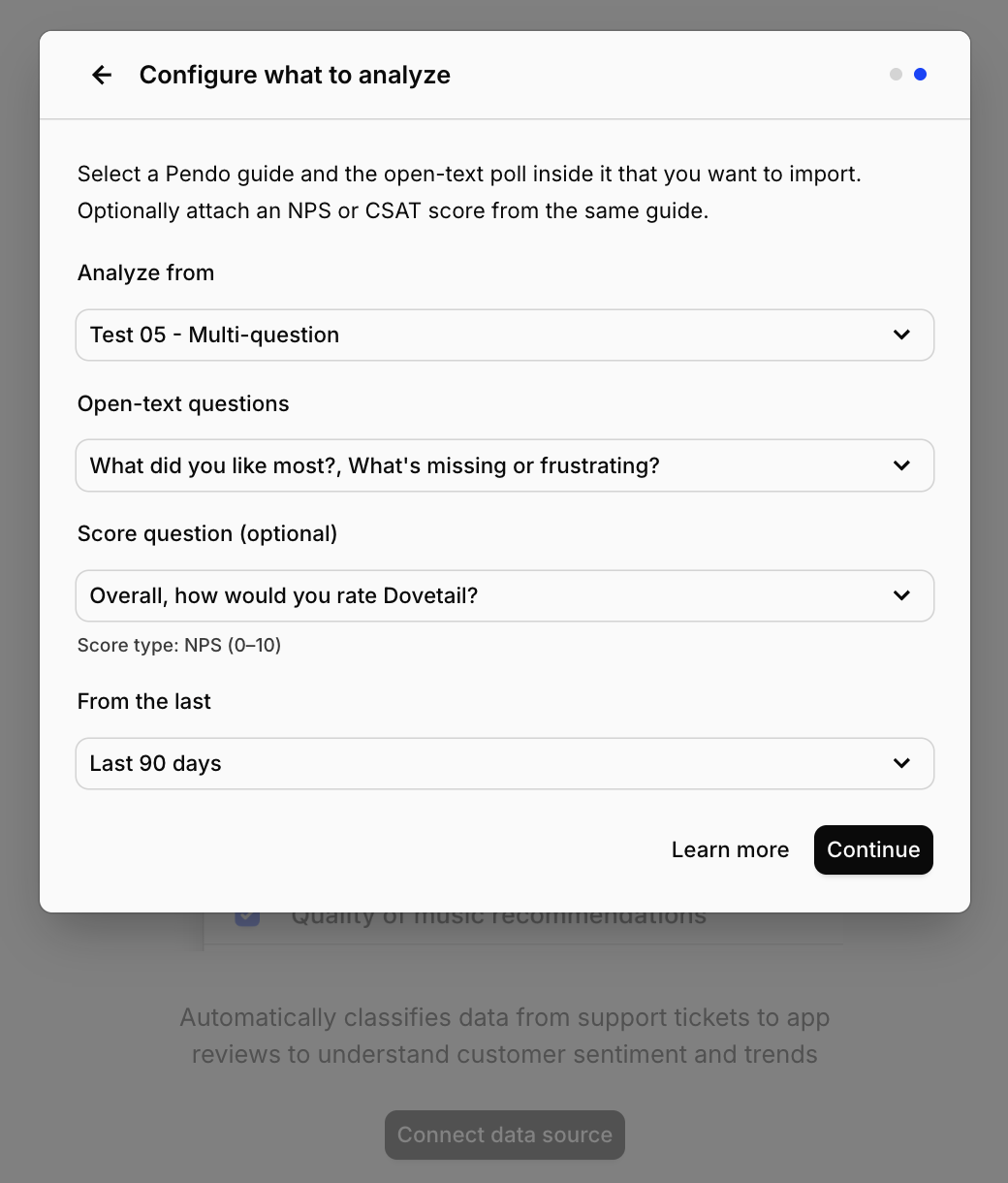
Choose the **PostHog survey** you want to analyze. Only surveys that contain at least one open-text question appear in the list.
Select one or more **open-text questions** inside that survey. If the survey has exactly one open-text question, Dovetail selects it for you.
Optionally pick a single **NPS or CSAT score question** from the same survey. Only questions PostHog classifies as NPS (0–10) or rating-on-a-5-point-scale (CSAT) are eligible.
Choose how far back to import existing responses: `Last 7 days`, `Last 30 days`, `Last 90 days`, or `Last 6 months`.
Confirm setup and select `Finish`.
## Overview
Automatically import responses to your PostHog Surveys into Channels in real-time, where they're analyzed and grouped into themes so you can track trends over time. If your survey pairs an open-text question with an NPS or CSAT score, Dovetail can pull both — use Dashboards to visualize NPS and CSAT charts.
When you set up the connection, you'll pick one survey, choose which open-text questions to analyze, and optionally attach a single NPS or CSAT score question. [Learn more about Channels →](/help/channels)
***
## Prerequisites
* A Dovetail workspace with Channels enabled and your user has Can edit or Full access on the Channel you're adding the source to.
* A PostHog account on either PostHog Cloud US (`us.posthog.com`) or PostHog Cloud EU (`eu.posthog.com`).
* The PostHog **project ID** for the project you want to import from. Find it under **Project settings → Details** in PostHog.
* A PostHog **personal API key** scoped to `survey:read` and `query:read`. Generate one under your account menu → **Personal API keys** in PostHog.
***
## Set up the PostHog integration
You can set up the PostHog integration from [Settings](https://dovetail.com/settings/integrations), when you create a new Channel, or when you `Add source` to an existing Channel.
In Dovetail, open the **Connect data source** modal and select `PostHog`.
Choose **Region** — `United States (us.posthog.com)` or `European Union (eu.posthog.com)`.
Enter your **Project ID** (a numeric value from PostHog's Project settings).
Paste your **Personal API key** (starts with `phx_`) and select `Next`.
Choose the **PostHog survey** you want to analyze. Only surveys that contain at least one open-text question appear in the list.
Select one or more **open-text questions** inside that survey. If the survey has exactly one open-text question, Dovetail selects it for you.
Optionally pick a single **NPS or CSAT score question** from the same survey. Only questions PostHog classifies as NPS (0–10) or rating-on-a-5-point-scale (CSAT) are eligible.
Choose how far back to import existing responses: `Last 7 days`, `Last 30 days`, `Last 90 days`, or `Last 6 months`.
Confirm setup and select `Finish`.
 ### Authentication and permissions
PostHog uses a **personal API key**. Dovetail makes two kinds of API calls on your behalf:
* `survey:read` — lets Dovetail list your surveys and read their question definitions so you can pick which survey and questions to analyze.
* `query:read` — lets Dovetail run HogQL queries against your project's events to fetch survey responses (`event = 'survey sent'`).
Both scopes are read-only. Dovetail never writes back to PostHog. The key is tied to the PostHog user who generates it — if that user loses access to the project, the sync will fail.
***
## Configuration in detail
### Picking a survey
You can pick **one survey** per data source connection. Surveys without at least one open-text question are excluded from the picker.
To analyze responses from more than one PostHog survey in the same Channel, add PostHog as a data source again with a different survey selected.
### Picking open-text questions
Within the chosen survey, you can select one or more **open-text questions** to import. Every selected question's response becomes a turn in the same conversation per respondent, so if a survey has a "What did you like?" and a "What could be better?" question, both answers from the same submission land on the same data point as a multi-turn exchange.
### Picking a score question (optional)
You can optionally pick **one** NPS (0–10) or rating-on-a-5-point-scale (CSAT) question from the same survey. Dovetail adds the score as a field onto the same data point as the open-text answer, which allows the channel to be selected as a source for NPS and CSAT charts in Dashboards.
***
## What gets imported
Each survey submission becomes one Channels data point, with the open-text answer (or answers) as the conversation content.
### Always imported
| Field | Source |
| ------------------------------- | -------------------------------------------------------------------------- |
| Survey ID | PostHog survey UUID |
| Survey name | PostHog survey name |
| Distinct ID | PostHog `distinct_id` for the respondent |
| Question text and response text | Each selected open-text question appears as a Q+A pair in the conversation |
| Submission timestamp | PostHog event `timestamp` |
### Imported when configured
| Field | When |
| ---------------- | ------------------------------------------------------------------------------------------ |
| NPS score (0–10) | When an NPS question is attached as the score field and the response is in range |
| CSAT score (1–5) | When a 5-point rating question is attached as the score field and the response is in range |
Scores outside the valid range are ignored.
### Not imported
* **Responses to questions you didn't select.** If a survey has five questions and you select two open-text ones plus an NPS, the other two are ignored.
* **Person properties** (`email`, custom traits, etc.). Only the PostHog `distinct_id` is captured.
* **Event properties** beyond the survey response columns.
* **Survey metadata** beyond the survey name and ID.
* **Question metadata** like scale labels or routing logic.
Need a field that isn't on this list? Let us know.
### Sync behavior
* **Backfill window.** When you first connect, Dovetail imports submissions received within the period you selected.
* **Ongoing sync.** New submissions sync in automatically after the initial backfill on the standard Channels cadence.
* **Pagination.** Dovetail fetches submissions in batches of 1,000 events per HogQL query and continues until the window is in.
* **Mechanics.** Dovetail issues HogQL queries against your project's events (`event = 'survey sent'` filtered by the survey ID), not the Surveys REST API. That's the only PostHog query path that returns the response text alongside the submission timestamp.
***
## Troubleshooting
**My API key won't validate.** Common causes:
* The key is missing one of the required scopes. Generate a new key in PostHog with both `survey:read` and `query:read` ticked.
* The key is for the wrong region. Confirm the region selector matches the cloud your PostHog account is on (`us.posthog.com` vs `eu.posthog.com`).
* The project ID is wrong. Pull it from **Project settings → Details** in PostHog — it's a small integer, not the project's UUID.
* The user who created the key no longer has access to the project.
**My survey doesn't show up in the picker.** Dovetail only lists surveys with at least one open-text question. Add an open-text question to the survey in PostHog and re-open the picker.
**My question doesn't show up in the score dropdown.** Only NPS (0–10) and rating-on-a-5-point-scale (CSAT) questions are eligible. Other rating scales aren't supported as score fields.
**Submissions exist in PostHog but Dovetail says nothing imported.** Possible reasons:
* Every submission in the backfill window only answered the score question and skipped the open-text questions you selected. Dovetail needs at least one open-text answer to create a data point.
* The submissions landed before your backfill window. Reconnect with a longer window, or wait for new submissions.
* PostHog's `survey sent` event isn't being captured for that survey. Check that the survey is published and the PostHog SDK is firing `survey sent` events for it.
**I want to analyze multiple surveys in the same Channel.** Add PostHog as a data source on the same Channel once per survey.
***
## Disconnect or delete the PostHog source
There are two distinct actions on a Channels source.
**Disconnect.** Stops Dovetail from ingesting any new data from this source. Anything already imported stays in the Channel.
To disconnect, open the Channel, go to the sources list, click `•••` on the PostHog source, and select `Disconnect`. You'll see:
> Are you sure you want to disconnect **\[source name]** from **\[Channel name]**? This will immediately stop the Channel from ingesting any new data. Any data already imported from this source will remain in the Channel.
**Delete.** Removes the source and **deletes every data point** that was imported from it. This is permanent.
To delete, click `•••` on the PostHog source and select `Delete`. You'll see:
> Are you sure you want to delete **\[source name]** from **\[Channel name]**? This will delete all associated data points. This is permanent and cannot be undone.
To revoke API access entirely, delete the personal API key in PostHog under your account menu → **Personal API keys**. That immediately invalidates any sync that tries to use it.
### Authentication and permissions
PostHog uses a **personal API key**. Dovetail makes two kinds of API calls on your behalf:
* `survey:read` — lets Dovetail list your surveys and read their question definitions so you can pick which survey and questions to analyze.
* `query:read` — lets Dovetail run HogQL queries against your project's events to fetch survey responses (`event = 'survey sent'`).
Both scopes are read-only. Dovetail never writes back to PostHog. The key is tied to the PostHog user who generates it — if that user loses access to the project, the sync will fail.
***
## Configuration in detail
### Picking a survey
You can pick **one survey** per data source connection. Surveys without at least one open-text question are excluded from the picker.
To analyze responses from more than one PostHog survey in the same Channel, add PostHog as a data source again with a different survey selected.
### Picking open-text questions
Within the chosen survey, you can select one or more **open-text questions** to import. Every selected question's response becomes a turn in the same conversation per respondent, so if a survey has a "What did you like?" and a "What could be better?" question, both answers from the same submission land on the same data point as a multi-turn exchange.
### Picking a score question (optional)
You can optionally pick **one** NPS (0–10) or rating-on-a-5-point-scale (CSAT) question from the same survey. Dovetail adds the score as a field onto the same data point as the open-text answer, which allows the channel to be selected as a source for NPS and CSAT charts in Dashboards.
***
## What gets imported
Each survey submission becomes one Channels data point, with the open-text answer (or answers) as the conversation content.
### Always imported
| Field | Source |
| ------------------------------- | -------------------------------------------------------------------------- |
| Survey ID | PostHog survey UUID |
| Survey name | PostHog survey name |
| Distinct ID | PostHog `distinct_id` for the respondent |
| Question text and response text | Each selected open-text question appears as a Q+A pair in the conversation |
| Submission timestamp | PostHog event `timestamp` |
### Imported when configured
| Field | When |
| ---------------- | ------------------------------------------------------------------------------------------ |
| NPS score (0–10) | When an NPS question is attached as the score field and the response is in range |
| CSAT score (1–5) | When a 5-point rating question is attached as the score field and the response is in range |
Scores outside the valid range are ignored.
### Not imported
* **Responses to questions you didn't select.** If a survey has five questions and you select two open-text ones plus an NPS, the other two are ignored.
* **Person properties** (`email`, custom traits, etc.). Only the PostHog `distinct_id` is captured.
* **Event properties** beyond the survey response columns.
* **Survey metadata** beyond the survey name and ID.
* **Question metadata** like scale labels or routing logic.
Need a field that isn't on this list? Let us know.
### Sync behavior
* **Backfill window.** When you first connect, Dovetail imports submissions received within the period you selected.
* **Ongoing sync.** New submissions sync in automatically after the initial backfill on the standard Channels cadence.
* **Pagination.** Dovetail fetches submissions in batches of 1,000 events per HogQL query and continues until the window is in.
* **Mechanics.** Dovetail issues HogQL queries against your project's events (`event = 'survey sent'` filtered by the survey ID), not the Surveys REST API. That's the only PostHog query path that returns the response text alongside the submission timestamp.
***
## Troubleshooting
**My API key won't validate.** Common causes:
* The key is missing one of the required scopes. Generate a new key in PostHog with both `survey:read` and `query:read` ticked.
* The key is for the wrong region. Confirm the region selector matches the cloud your PostHog account is on (`us.posthog.com` vs `eu.posthog.com`).
* The project ID is wrong. Pull it from **Project settings → Details** in PostHog — it's a small integer, not the project's UUID.
* The user who created the key no longer has access to the project.
**My survey doesn't show up in the picker.** Dovetail only lists surveys with at least one open-text question. Add an open-text question to the survey in PostHog and re-open the picker.
**My question doesn't show up in the score dropdown.** Only NPS (0–10) and rating-on-a-5-point-scale (CSAT) questions are eligible. Other rating scales aren't supported as score fields.
**Submissions exist in PostHog but Dovetail says nothing imported.** Possible reasons:
* Every submission in the backfill window only answered the score question and skipped the open-text questions you selected. Dovetail needs at least one open-text answer to create a data point.
* The submissions landed before your backfill window. Reconnect with a longer window, or wait for new submissions.
* PostHog's `survey sent` event isn't being captured for that survey. Check that the survey is published and the PostHog SDK is firing `survey sent` events for it.
**I want to analyze multiple surveys in the same Channel.** Add PostHog as a data source on the same Channel once per survey.
***
## Disconnect or delete the PostHog source
There are two distinct actions on a Channels source.
**Disconnect.** Stops Dovetail from ingesting any new data from this source. Anything already imported stays in the Channel.
To disconnect, open the Channel, go to the sources list, click `•••` on the PostHog source, and select `Disconnect`. You'll see:
> Are you sure you want to disconnect **\[source name]** from **\[Channel name]**? This will immediately stop the Channel from ingesting any new data. Any data already imported from this source will remain in the Channel.
**Delete.** Removes the source and **deletes every data point** that was imported from it. This is permanent.
To delete, click `•••` on the PostHog source and select `Delete`. You'll see:
> Are you sure you want to delete **\[source name]** from **\[Channel name]**? This will delete all associated data points. This is permanent and cannot be undone.
To revoke API access entirely, delete the personal API key in PostHog under your account menu → **Personal API keys**. That immediately invalidates any sync that tries to use it.