

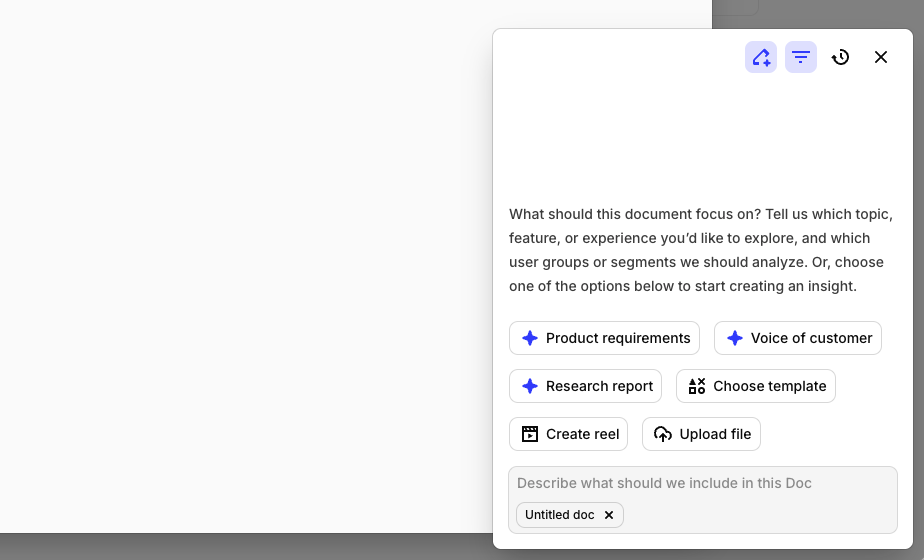
How to build a report in Dovetail
You can generate reports from three different entry points in Dovetail, each suited to different workflows and different scopes. Choose the method that fits your current workflow.From Docs
When you create a Doc directly within a project or folder, Dovetail analyzes all the data in that specific context to generate your report. This method gives you precise control over scope—you’re always working with a defined dataset, whether that’s a single research study or an entire folder of related projects.- When to use: Ideal when you know exactly what data you want to analyze and need a polished, standalone report you can refine and share.
- Available scopes: Project, folder
- Learn more about creating reports in Docs
From Contextual Chat
Contextual Chat lets you explore your data conversationally and capture insights as they emerge. At any point in your session, you can convert the latest response into a shareable Doc — so it’s easy to preserve discoveries and distribute findings without breaking your flow.- When to use: Perfect for exploratory analysis, quick insights, or when you want to iterate on your questions and prompts before finalizing a report.
- Available scopes: Project, channel, folder
From Agents
Agents automate report generation on a schedule you define. You can configure an Agent to create and send Docs at regular intervals—weekly competitive analysis, monthly voice of customer summaries, or quarterly research digests. Once set up, your reports arrive automatically without manual prompting.- When to use: Best for recurring reports, stakeholder updates, tracking how themes and sentiment evolve over time or when you need a refined selection of data sources
- Available scopes: Project, channel, folder, multiple projects, projects(s) & channel(s)
- Learn more about creating scheduled reports with Agents
General Guidelines
Great reports start with clear, specific prompts. These eight principles will help you write prompts that generate focused, actionable reports—no matter what context you’re working in.Start with clear objectives
Start with clear objectives
Specify structure and sections
Specify structure and sections
- Overview of the feature
- Customer pain points we’re solving
- Functional requirements
- Acceptance criteria
- Technical constraints
Provide context and scope
Provide context and scope
- What they value most
- Pricing concerns
- Comparison to competitors
- Willingness to pay for premium features
Request specific analysis types
Request specific analysis types
- Summarizes overall sentiment (positive/negative/neutral)
- Identifies top 5 themes with customer quotes
- Highlights opportunities and risks
- Focuses on feedback from the last 3 months
Guide the depth and detail level
Guide the depth and detail level
- Detailed analysis (2-3 paragraphs)
- Multiple supporting quotes (3-5 per point)
- Specific examples from the data
- Actionable recommendations
Use multi-turn conversations
Use multi-turn conversations
- Message 1: I want to create a report on user onboarding issues
- Message 2 (after seeing initial results): Focus specifically on the mobile app onboarding flow, not the web version
- Message 3: Add a section comparing our onboarding to competitors mentioned in the interviews
Specify formatting preferences
Specify formatting preferences
- Level 1 headers for main sections
- Level 2 headers for subsections
- Bullet points for key findings
- Block quotes for customer quotes
- Keep paragraphs concise (1-2 sentences)
Custom Prompt Example
Guidelines by Context Scope
The scope of your data—whether it’s a single project, an entire folder, or a combination of sources—shapes how you should structure your prompts and which tool you will use. Each context type requires different strategies for organizing findings, attributing sources, and synthesizing insights.Available tools by Context Scope
| Docs | Contextual Chat | Agents | |
|---|---|---|---|
| Project level | ✓ | ✓ | ✓ |
| Folder level | ✓ | ✓ | ✓ |
| Channel level | ✓ | ✓ | |
| Multiple projects | ✓ | ||
| Project(s) + Channel(s) | ✓ |
Project level
When working within a single project, you have a cohesive dataset. Your prompts should help Dovetail go deep on themes, trace patterns across interviews or observations, and build a narrative that stays true to that single project. You can create reports from a project using:- Contextual Chat – Start a chat within the project, ask your questions, and convert any response into a Doc
- Docs – Create a new Doc directly in the project to generate a report from all data in that context
- Agents – Set up an automated Agent to generate and send reports on a schedule
Lean on the project overview when it exists
Lean on the project overview when it exists
Go deep, not wide
Go deep, not wide
- Go deep on each theme (longer analysis, more quotes)
- Trace patterns across multiple notes or interviews
- Call out nuance and contradictions
Choose a structure by data type
Choose a structure by data type
- Create a report organized by:
- Key themes (not by individual interview)
- Supporting quotes from multiple participants per theme
- Participant diversity (e.g., roles, segments) when it adds meaning
- Clear problem statement and recommendations grounded in this project
- Create a report organized by task or by research question. For each:
- What we asked / what people did
- Main findings and patterns
- Representative quotes
- Severity or impact where relevant
- Create a report that synthesizes all notes and Docs in this project into 5–7 themes. For each theme: summary, evidence from the project, and 2–4 quotes. End with clear implications and next steps for this project.
Narrow scope by fields and/or time
Narrow scope by fields and/or time
- Interviews where segment = Enterprise segment
- Data from the last 6 months
Channel level
Channels contain ongoing streams of feedback—support tickets, app reviews, community messages. Your prompts should guide Dovetail to identify volume-based patterns, track sentiment over time, and surface both frequent issues and emerging themes. You can create reports from a channel using:- Contextual Chat – Start a chat within the channel, ask your questions, and convert any response into a Doc
- Agents – Set up an automated Agent to generate and send reports on a schedule
Leverage theme-based organization
Leverage theme-based organization
- For each major theme:
- Summarize the theme’s core issue
- Include 3-5 representative datapoint quotes
- Note sentiment patterns (positive/negative/neutral)
- Identify volume trends (increasing/decreasing)
- Highlight any sub-themes or related patterns
Request sentiment analysis
Request sentiment analysis
- Overall sentiment breakdown (positive/negative/neutral percentages)
- Sentiment trends over time
- Themes with the most negative sentiment
- Themes with positive sentiment (what users love)
- Sentiment shifts and what might have caused them
Guide volume vs insight analysis
Guide volume vs insight analysis
- Volume-based patterns: High-frequency issues mentioned across many datapoints
- Insight-based patterns: Deeper themes that emerge from analyzing multiple datapoints together
- Trend analysis: How themes have changed over time (last 3 months vs previous period)
Use data range filtering
Use data range filtering
- New themes that emerged
- Themes that increased in volume
- Themes that decreased
- Sentiment changes over time
Request theme synthesis
Request theme synthesis
- Identifies the top 5-7 themes by volume
- Synthesizes related themes into broader categories
- Highlights emerging themes (new or growing)
- Notes declining themes (less frequent mentions)
- Includes representative quotes from each major theme
Folder level
Folders can contain multiple projects and represent a broader body of data. The key decision here is whether to treat everything as one unified corpus or to preserve the structure of sub-folders and individual projects. Your prompt should make this organizational choice explicit. You can create reports from a folder using:- Contextual Chat – Start a chat within the folder, ask your questions, and convert any response into a Doc
- Docs – Create a new Doc directly in the folder to generate a report from all data in that context
- Agents – Set up an automated Agent to generate and send reports on a schedule
Choose how to organize your report by hierarchy
Choose how to organize your report by hierarchy
- [Sub-folder A] – themes and findings from projects in this sub-folder
- [Sub-folder B] – themes and findings from projects here
- [Sub-folder C] – same
- Cross-folder themes – patterns that show up in multiple sub-folders
- Synthesizes themes across the whole folder
- When a theme is mostly from one or two projects, name those projects
- For cross-cutting themes, note which projects they appear in
- Use project names from the folder structure to add clarity
Use the folder's role in the prompt
Use the folder's role in the prompt
Call out project types when you know them
Call out project types when you know them
- User interview projects
- Usability test projects
- Survey analysis projects
Ask for cross-project synthesis
Ask for cross-project synthesis
- Synthesizes findings across all projects in this folder
- Highlights themes that appear in multiple projects (cross-project validation)
- Flags findings that appear in only one project (may need more research)
- Uses project diversity as a strength (different methods, segments, time periods)
Multiple projects
When you select specific projects to analyze together, you’re looking for cross-project patterns while preserving the unique context of each study. Your prompts should guide whether to synthesize into unified themes, compare findings across projects, or both. You can create reports from multiple chosen projects using:- Agents – Set up an automated Agent that analyzes your selected projects and sends reports on a schedule
Guide the organization's structure
Guide the organization's structure
- Mobile App Onboarding - findings specific to mobile
- Web Platform Onboarding - findings specific to web
- Enterprise Customer Onboarding - findings specific to enterprise
- Cross-project patterns - themes that appear across all projects
- Unified themes section - common patterns across all projects
- Project-specific insights section - unique findings per project
- Comparative analysis - how findings differ between projects
Request comparative analysis
Request comparative analysis
- Project A: Mobile App
- Project B: Web Platform
- Project C: Enterprise Portal
- How frequently it appears in each project
- Severity differences between projects
- Project-specific nuances
- Overall patterns that transcend individual projects
Specify project attribution in quotes
Specify project attribution in quotes
Handle project context differences
Handle project context differences
- SMB Customer Interviews (Project A)
- Enterprise Sales Calls (Project B)
- Mid-Market Surveys (Project C)
Request project weighting or prioritization
Request project weighting or prioritization
- Primary: Enterprise Customer Research (most important)
- Secondary: SMB Customer Interviews (supporting)
- Tertiary: User Surveys (additional context)
Combination of project(s) and channel(s)
Combining structured data (projects) with unstructured feedback streams (channels) gives you both depth and breadth. Your prompts should help Dovetail balance these different data types—using interviews for deep insights and channels for volume validation. You can create reports from a combination of projects and channels using:- Agents – Set up an automated Agent that analyzes your selected projects and channels, then sends reports on a schedule
Guide on how to handle different data types
Guide on how to handle different data types
- Deep insights from user interviews
- Detailed findings from research studies
- Context-rich quotes from transcripts
- Quick feedback from App Store reviews
- Support ticket pain points
- Community discussion snippets
- Deep insights from project interviews (primary evidence)
- Supporting feedback from channels (volume/trend validation)
- Note the source type when relevant (interview vs review vs ticket)
Request data type attribution
Request data type attribution
- [Interview] for quotes from project interviews
- [Review] for quotes from App Store reviews
- [Support] for quotes from support tickets
- [Community] for quotes from Slack/community channels
Guide synthesis approach
Guide synthesis approach
- Lead with deep insights from project interviews
- Support with volume/trends from channel datapoints
- Show how structured research validates unstructured feedback
- Include quotes from both sources
- Structured research findings (from projects)
- Unstructured feedback patterns (from channels)
- Synthesis - how both sources align or differ
- Unified themes section - patterns across all sources
- Deep dive sections - detailed findings from project interviews
- Volume/trend sections - patterns from channel datapoints
- Cross-validation - where project research confirms channel feedback
Account for data quality differences
Account for data quality differences
- Rich context and detailed insights
- Use for primary findings and deep analysis
- Quote longer excerpts when needed
- Shorter, more frequent feedback
- Use for volume validation and trend identification
- Quote concise snippets
- Note when patterns are volume-based vs insight-based
Request comparative analysis
Request comparative analysis
- Where do project interviews align with channel feedback?
- Where do they differ? (e.g., interviews reveal root causes, channels show symptoms)
- What insights are unique to each source type?
- How does structured research validate or challenge channel trends?
Frequently Asked Questions
How long does it take to generate a report
How long does it take to generate a report
Who can create a report in Dovetail?
Who can create a report in Dovetail?